im still on the guy engine v1 cuz if im gonna be honnest, i was not expecting v2 to arive as quick as it did, so i gave it a whirl for a year. i gotta say, going to move on to v2 for variety sake, but there is something about v1 that feels so... raw? love the ui update for v2, but v1's aesthetic of "y2k sound font library with a sick ui", something about it just fits my vibe. Has the exact same charm as the ui for MTV MUSIC GENERATOR 2 for the PS2. :D
[my music is much more inspired by the launch title game from the PS2; Evergrace, and the vibe of v2 is much more PS2 inspired so i think the vibe switch will fit my music making mindset like v1 did] i know that v2 has a lot more tools and toys to get down with as well, but i cant shake the feeling that there is something in v1 that just still feels right i guess. even though you consider it obsolete, i'd say v1 still left its mark on my music this year and has helped me make tons of bangers! kudos to u my friend, thank you for making such a dope product, TWICE! :3
Haha thank you for saying that! I'm definitely glad to hear that you enjoy both for different reasons. There is something kinda special about v1. I had to shelf it just because the framework I used when making it is just so limited, I needed to be able to do so much more. That's how V2 came to be actually. There were things I wanted to do that I just couldn't because of the limitations. If you're still using it and getting enjoyment out of it, then that's great!
Hey! The serial number is found in the "My Library" section of your itch.io account.
- Click the little arrow in the top right corner of your screen - Click "My Library" - Click on "My Purchases" on the left - Click on GuyEngine V2 - Scroll to the bottom where it says "Claim download key" - Click the button that says "Claim download key" - Write it down! 😁
(things that aren't GuyEngine: the lead synth on that second part is a MicroKorg, overdriven guitars are layered from Touhou + JV-1080, drums are just a chopped break)
Thanks! At first I was aiming for a Final Fantasy Tactics kinda vibe with the orchestration and such, but it got derailed into other JRPG inspiration zones quickly, haha
Hi, could you give me some more details? What OS are you using? What DAW are you using? Is this your first time downloading GuyEngine V2, or are you updating from a previous version?
I'm not sure what 1.0.3.1 refers to, but GuyEngine V2 is currently on version 1.2.3. When updating to a new version, make sure you either completely replace the previous version, or delete it entirely. Older versions can cause conflicts with newer versions.
Also make double sure that everything is in the correct folder. Additionally, if you're using VST2 and VST3, they must both be updated or they can conflict and just not work.
Also, if all else fails, just totally delete any trace of the plugin, scan in your DAW so that it clears it out, and then reinstall the VST and scan again and that might do the trick
I'm really loving this plugin and all the creative video game inspired sounds! As a game developer who's learning music production to make music for my own games, I really think this will become a go-to plugin for me! :)
However I've noticed a bug where my Starred presets stopped saving...
It used to work just fine, but now when I star my favorite sounds and then click on the starred tab, they don't appear. Maybe something changed after installed some expansions, I'm not sure...
Thanks for all your hard work on this plugin and the expansions!
I've tested this VST in Linux and it's overall usable as is with WINE and yabridge, however there are issues with the UI of the reverb settings and some other stuff that may have problems. Would love this VST even more if theres was LV2 support for Linux in the future.
So, I've been enjoying this plugin, however I've had an issue since I downloaded the new expansions. The expansions show up just fine in the browser tab, but the factory content doesn't appear in the browser even if I click on the "factory content" option in the drop-down menu above. The samples do appear down in the Timbre section, but I am confused as to why they don't appear in the browser. I've even reinstalled both the plugin and samples, and the entire folder in Roaming to see if that fixes anything, but no dice. Is there any way to solve this?
Hey thanks for your comment. This is a really common annoyance that comes from the framework. If you want to get back to the factory presets, you have to deselect the currently selected expansion in the leftmost tab of the preset browser. Then you'll see the left-middle tab repopulate with the factory stuff.
It's extremely annoying and we're working to fix it! But you can still access the content, it's just a dumb way to do so. 😠
Hey! I just got this and wanted to give it a shot on my Macbook. I seem to be missing a file though? When I open the GuyEngine in FL Studio it says /Users/[UserName]/Library/Application Support/Ultima DSP LLC/GuyEngine V2/AudioResources.dat can't be found
I've looked through all the ZIP files and checked the folder, but I can't find it.
help, i reinstalled windows on my pc, and my convolution reverbs are gone. where are they located after install? when i installed the plugin, it asked for the presets zip, but i just gave it the extracted folder from the previous time installing. so everything is working, besides my missing reverb samples. any idea where those are?
hello I need some help. installed this on Mac, and after scanning the samples the plugin goes black (empty). reset the plugin manager. deleted cashes and uninstalled all files and installed it again. same thing happens, loads samples then goes black. don't know what too do now.

← Return to plugin
Comments
Log in with itch.io to leave a comment.
im still on the guy engine v1 cuz if im gonna be honnest, i was not expecting v2 to arive as quick as it did, so i gave it a whirl for a year. i gotta say, going to move on to v2 for variety sake, but there is something about v1 that feels so... raw? love the ui update for v2, but v1's aesthetic of "y2k sound font library with a sick ui", something about it just fits my vibe. Has the exact same charm as the ui for MTV MUSIC GENERATOR 2 for the PS2. :D
[my music is much more inspired by the launch title game from the PS2; Evergrace, and the vibe of v2 is much more PS2 inspired so i think the vibe switch will fit my music making mindset like v1 did] i know that v2 has a lot more tools and toys to get down with as well, but i cant shake the feeling that there is something in v1 that just still feels right i guess. even though you consider it obsolete, i'd say v1 still left its mark on my music this year and has helped me make tons of bangers! kudos to u my friend, thank you for making such a dope product, TWICE! :3
Haha thank you for saying that! I'm definitely glad to hear that you enjoy both for different reasons. There is something kinda special about v1. I had to shelf it just because the framework I used when making it is just so limited, I needed to be able to do so much more. That's how V2 came to be actually. There were things I wanted to do that I just couldn't because of the limitations. If you're still using it and getting enjoyment out of it, then that's great!
Hi there I purchased this VST and yet I have not gotten a serial number. Where is the serial number?
Hey! The serial number is found in the "My Library" section of your itch.io account.
- Click the little arrow in the top right corner of your screen
- Click "My Library"
- Click on "My Purchases" on the left
- Click on GuyEngine V2
- Scroll to the bottom where it says "Claim download key"
- Click the button that says "Claim download key"
- Write it down! 😁
It really inspired for making a new track, it uses a lot of its soundfonts and LOVED it. Hoped you like it and keep it coming!
https://soundcloud.com/inouno_sp/battle-against-an-old-friend
(things that aren't GuyEngine: the lead synth on that second part is a MicroKorg, overdriven guitars are layered from Touhou + JV-1080, drums are just a chopped break)
Nice track. Japanese sound
Thanks! At first I was aiming for a Final Fantasy Tactics kinda vibe with the orchestration and such, but it got derailed into other JRPG inspiration zones quickly, haha
this happens often =)
Very inspiring tool! I still hope that you will add modwheel for vibrato =)
I just downloaded the most recent version of this plugin, but it doesn't show up in my DAW, even though I rescanned it multiple times
Hi, could you give me some more details? What OS are you using? What DAW are you using? Is this your first time downloading GuyEngine V2, or are you updating from a previous version?
Well, I'm using Windows 10 and the DAWs I'm using are Reaper and OpenMPT. And I just updated from the version 1.0.3.1
I'm not sure what 1.0.3.1 refers to, but GuyEngine V2 is currently on version 1.2.3. When updating to a new version, make sure you either completely replace the previous version, or delete it entirely. Older versions can cause conflicts with newer versions.
Also make double sure that everything is in the correct folder. Additionally, if you're using VST2 and VST3, they must both be updated or they can conflict and just not work.
Also, if all else fails, just totally delete any trace of the plugin, scan in your DAW so that it clears it out, and then reinstall the VST and scan again and that might do the trick
I reinstalled the VST and scanned again. The problem still remains. The plugin doesn't show up
I'm really loving this plugin and all the creative video game inspired sounds! As a game developer who's learning music production to make music for my own games, I really think this will become a go-to plugin for me! :)
However I've noticed a bug where my Starred presets stopped saving...
It used to work just fine, but now when I star my favorite sounds and then click on the starred tab, they don't appear. Maybe something changed after installed some expansions, I'm not sure...
Thanks for all your hard work on this plugin and the expansions!
I've tested this VST in Linux and it's overall usable as is with WINE and yabridge, however there are issues with the UI of the reverb settings and some other stuff that may have problems. Would love this VST even more if theres was LV2 support for Linux in the future.
So, I've been enjoying this plugin, however I've had an issue since I downloaded the new expansions. The expansions show up just fine in the browser tab, but the factory content doesn't appear in the browser even if I click on the "factory content" option in the drop-down menu above. The samples do appear down in the Timbre section, but I am confused as to why they don't appear in the browser. I've even reinstalled both the plugin and samples, and the entire folder in Roaming to see if that fixes anything, but no dice. Is there any way to solve this?
Hey thanks for your comment. This is a really common annoyance that comes from the framework. If you want to get back to the factory presets, you have to deselect the currently selected expansion in the leftmost tab of the preset browser. Then you'll see the left-middle tab repopulate with the factory stuff.
It's extremely annoying and we're working to fix it! But you can still access the content, it's just a dumb way to do so. 😠
I hope that helps!
Thank you for the response! Yes that, helped! Hopefully you'll be able to fix the cause soon.
@Skankindead this will be fixed in the next release
Hey! I just got this and wanted to give it a shot on my Macbook. I seem to be missing a file though? When I open the GuyEngine in FL Studio it says /Users/[UserName]/Library/Application Support/Ultima DSP LLC/GuyEngine V2/AudioResources.dat can't be found
I've looked through all the ZIP files and checked the folder, but I can't find it.
Hey, version 1.2.0 shipped with an error. 1.2.1 was just uploaded literally moments ago. If you grab that one and replace, you should be good to go!
Oh, so I just had really bad timing! Yeah, can report version 1.2.1 works flawlessly! Thank you, I'm gonna have a lot of fun with this~
help, i reinstalled windows on my pc, and my convolution reverbs are gone. where are they located after install? when i installed the plugin, it asked for the presets zip, but i just gave it the extracted folder from the previous time installing. so everything is working, besides my missing reverb samples. any idea where those are?
Hey! The impulse responses are a separate file. Just go to where you download GuyEngine, and you'll see a zip file called Impulse Responses.
thanks! found it
hello I need some help. installed this on Mac, and after scanning the samples the plugin goes black (empty). reset the plugin manager. deleted cashes and uninstalled all files and installed it again. same thing happens, loads samples then goes black. don't know what too do now.
We're working on it!
Thanks! I really like your plugin. Please just add vibrato to the modwheel. That would be great. Thank you for your work!
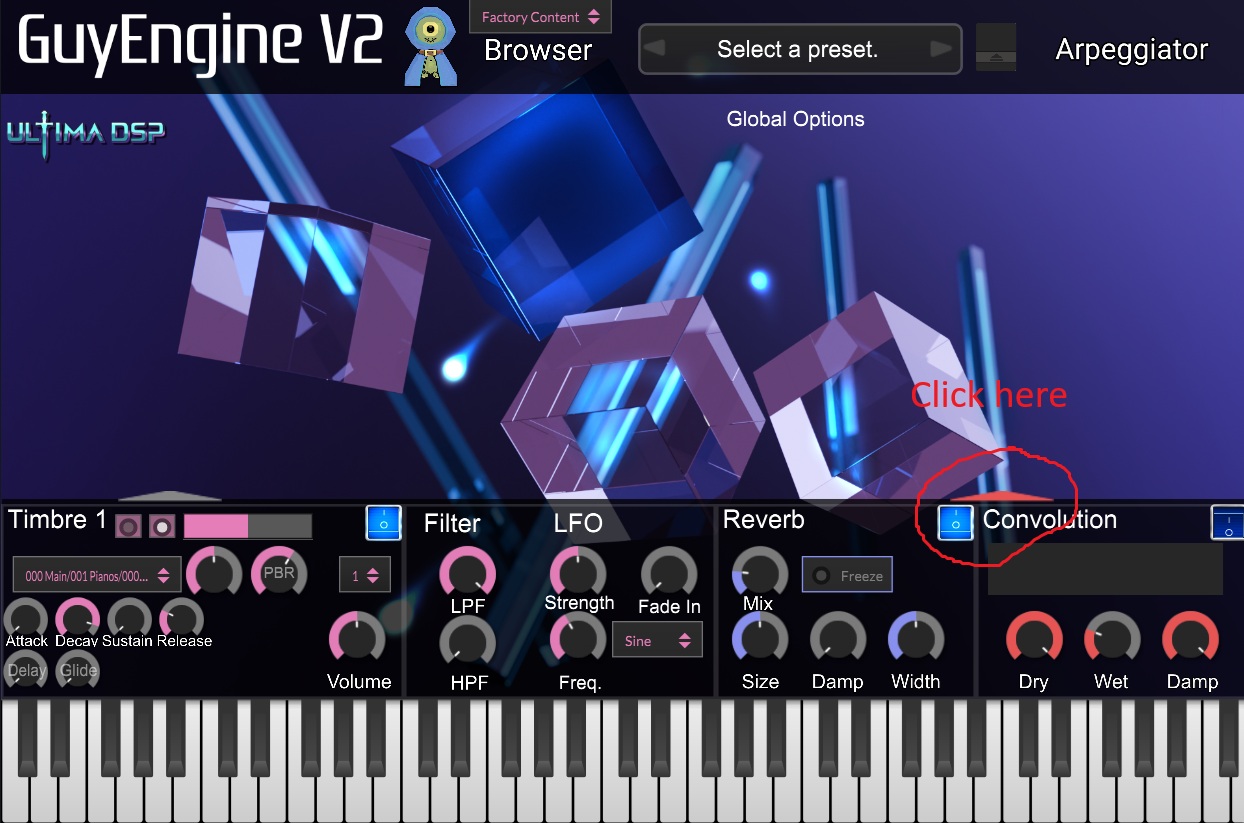
Just click this little tab, and it'll pop right up for you!